
Please Note: This article is written for users of the following Microsoft Word versions: 2007, 2010, 2013, 2016, 2019, and 2021. If you are using an earlier version (Word 2003 or earlier), this tip may not work for you. For a version of this tip written specifically for earlier versions of Word, click here: Changing the Default File Name.
When you save a Word document for the first time, Word typically uses the first paragraph of the document as the suggested file name in the Save As dialog box. In reality, this choice for a default file name is the second choice for Word. It will use your document title as the default file name, provided you have set one.
You can use this information to your benefit by setting the document title in the templates you use to create your documents. For instance, let's say you use a template to create your letters. When you normally save a new letter, Word picks up the default file name from the first paragraph, which may be your letterhead or the date.
If you change the document title in the template to something such as Personal Letter, then Word will use Personal Letter.doc as the suggested file name. This is obviously much closer to how you want the saved file named than if Word had suggested the letterhead or the date. All you need to do is quickly customize the name (to something such as Personal Letter to Bill.docx) in the Save As dialog box.
To set a document title in a template, you use the Properties dialog box for the template. How you display the dialog box depends on the version of Word you are using:
Make sure you do the above steps, depending on your version, after opening the template file. Regardless of which version of Word you are using, make sure the Summary tab is displayed. (See Figure 1.)
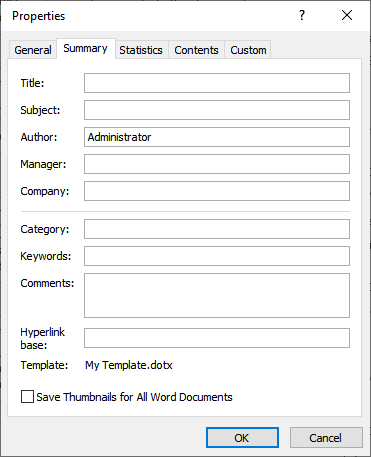
Figure 1. The Summary tab of the Properties dialog box.
Next, change the contents of the Title field to the default file name you want to use. You do not need to include the .Dotx portion of the file name. When done, click OK and then save and close the template.
WordTips is your source for cost-effective Microsoft Word training. (Microsoft Word is the most popular word processing software in the world.) This tip (5920) applies to Microsoft Word 2007, 2010, 2013, 2016, 2019, and 2021. You can find a version of this tip for the older menu interface of Word here: Changing the Default File Name.

Do More in Less Time! An easy-to-understand guide to the more advanced features available in the Microsoft 365 version of Word. Enhance the quality of your documents and boost productivity in any field with this in-depth resource. Complete your Word-related tasks more efficiently as you unlock lesser-known tools and learn to quickly access the features you need. Check out Microsoft 365 Word For Professionals For Dummies today!
When you often perform a series of steps, the best solution to make those steps easier is to create a macro. This tip ...
Discover MoreWhen you save a document as a PDF file, Word allows you to specify how that PDF should be put together. This tip examines ...
Discover MoreSome people use their computers for little else, other than to work on Word documents. If that is the case with you, then ...
Discover MoreFREE SERVICE: Get tips like this every week in WordTips, a free productivity newsletter. Enter your address and click "Subscribe."
2024-10-11 04:46:21
Jose
Hi,nThank you very much for your tips! They are all great. As you already know.nIn this tips I am haven some kind of trouble, because althoug I edit the title in the dialog box, when I save as it only uses the 8 first caracters. Let's say I want to save as "AAAAMMDD_XL_LET_", it only uses the "AAAAMMDD". I tried with "" and without and I do not found a way to solve it.nThank you very much for your help.nnJosé (from Spain)
2021-08-27 00:30:29
sunny
Word 365 Formula How to extract text from Template File Name (constructed Excel-Formula-Style) ? until Microsoft updates for sake of Unified User Experiencenhttps://bit.ly/3Bv9ppFnAs part of Default File Name automation (w/o VBA) for Word 365, I am working around limitation of special characters . PowerPoint do not share this limitation.nSince Microsoft should have Unified User Experience, I expect this limitation to be temporary.nIf Word 365 accept special characters, my first paragraph will be "0.Cover 2021 06" which PowerPoint is capable of (using Period Variant U+2024 ONE DOT LEADER ․n"0․Cover 2021 06.pdf¶" which is almost identical to human eye "0.Cover 2021 06.pdf")nBefore this happens, my first paragraph will be "0句號Cover 2021 06" to be extracted from Template-File-Name.nWhen Word accept special characters, all End-User need to do is change Template-File-Name to "tool.Redbook.CoverPage.Text(0.Cover 2021 06).dotx". nThis frees End-User from changing formula to get FileSaveAsDialogBox to show "0.Cover 2021 06" when Word improves. He/She only needs to change Template File Name to "tool.Redbook.CoverPage.Text(0.Cover 2021 06).dotx" nHow to get "0句號Cover 2021 06" from "tool.Redbook.CoverPage.Text(0句號Cover 2021 06).dotx" which is Template-File-Name ?nDetails of Word Default File Name limitations:nWord 365 Default File Name using First paragraph - character - Microsoft Community
2021-08-26 23:06:07
Since Microsoft Office should have Unified User Experience, since PowerPoint 365 show "0․Cover 2021 08.pdf¶" in SaveAs DialogBox, IMHO, Word should match PowerPoint?nnPeriod Variant U+2024 ONE DOT LEADER ․nExample of 1st paragraph "0․Cover 2021 08.pdf¶" which is almost identical to human eye "0.Cover 2021 08.pdf"nnLeader (typography) - WikipediaLeader (typography) - WikipedianBut this requires Microsoft involvement which is beyond my control..
2021-08-26 22:12:44
sunny
my 2cent alternative (least disruption of code pertinent to name-output of FileSaveAs DialogBox) is to use variant of period:nPeriod Variant U+2024 ONE DOT LEADER ․nExample of 1st paragraph "0․Cover 2021 08.pdf¶" which is almost identical to human eye "0.Cover 2021 08.pdf"nLeader (typography) - WikipediaLeader (typography) - WikipedianBut this requires Microsoft involvement which is beyond my control....nIs there another way?
2021-08-26 21:33:50
sunny
While still aiming program-free solution, is there more info why period/comma results in truncated Name ? ;nnFile-SaveAs-Dialog-Box currently shows "0.docx" when 1st paragraph is "0,Cover 2021 08.pdf¶" ?nnComma is not in list of reserved characters; nnPeriod may be problematic b/c it separate base file name from extension but not in Reserve list nnQuote https://bit.ly/3kuVCII of Use of Period and Reserved Characters :nn"nnUse a period to separate the base file name from the extension in the name of a directory or file.nnUse any character in the current code page for a name, including Unicode characters and characters in the extended character set (128–255), except for the following:nnThe following reserved characters:nn< (less than)nn> (greater than)nn: (colon)nn" (double quote)nn/ (forward slash)nn\ (backslash)nn| (vertical bar or pipe)nn? (question mark)nn* (asterisk)nnInteger value zero, sometimes referred to as the ASCII NUL character."
2021-08-25 04:10:03
sunny
Please correct if wrong, quote " Word picks up the default file name from the first paragraph" means text up to first punctuation mark or Unicode Character....
2021-08-25 00:30:29
sunny
For those who have to Automate w/o VBAnnhttps://answers.microsoft.com/en-us/msoffice/forum/msoffice_word-mso_win10-mso_o365b/word-365-conditional-text-to-depend-on-document/d3c24b59-1718-4245-b0bd-34e909f262aa?messageId=0561fa40-7f7c-4da7-b9fc-15dca0ff5763
2021-08-20 00:08:54
sunny
Thanks for very useful tip. Is it also possible Word 365 picks up the default file name from the first paragraph which includes:n⒈ period within a line ? Save As dialog box showing words preceding the period.n⒉ field-code-formulas ? Save As dialog box is showing blank NOT formula resultnKR!
2021-05-20 10:03:16
Andrew
Haihm, what do you mean by "the name shown inside"? If you are referring to a field code that displays the name of the file, for example in a footer, then you really can't do anything about it directly, since Word will save the PDF file to look like the Word file would look if printed. Here are some work arounds you could try:n1. Edit the PDF file after you create it to change the filename text.n2. Edit the Word file to replace the field with its result (using Ctrl-Shift-F9) and then change the filename text of the result before you create the PDF.n3. Change the name of the Word file by saving it under the new name, update fields, and then save it as a PDF (however, this would still show the Word extension e.g., .docx).nnAndy.
2021-05-19 12:48:21
Phil Rabichow
Find your file in File Explorer, select it, press F2, & change your pdf file to what you want.
2021-05-18 17:33:17
Haihm
I am trying to save my word as a pdf file, when I save the file for a specfic name like (CAR). Then when I open the saved PDF file, the name shown inside is default to as an example (BUS). Could you please help with that. nnthanks a lot,nHaithm
2017-01-20 10:56:50
Shirley Wilcox
Thank you Phil. That worked just fine. I am new to Word 2016 and thought it could be done as it was in Word 2007. Some things seem to be more difficult with these new "upgrades".
2016-09-26 12:38:50
Phil Rabichow
Can't you just go to Windows Explorer, find your file & change it's name?
2016-09-25 19:33:59
Peter Barry
When I saved the name of a file, I omitted two letters from the name.. How can I amend the File's name to include these letters?
Peter Barry
2016-03-14 04:41:56
Jean
Dear Allen,
I would like to have a template file name when saving like: “Title – [Title ID] – [Report Title].docs”
If we set the “Title” in the document property, it only shows “Title”. Do you know if there is a way to use special characters and space in Title & set it as default file name when saving, except using macros?
Appreciate your help.
Beset Regards,
Jean
2015-12-17 06:55:47
Thanks for this, however it doesn't work. The default name given to the file gets chopped off at the first non-alphanumeric character.
So when I have set the document Title to be:
[DATE]-Incident-Report-[PM-NAME]
in fact when I click 'Save As', I see
[DATE].docx
Does anyone know a way around this? Can the 'Save As' button have a Macro attached to it which will insert a filename into the Save As dialog box?
Thanks for any help.
Stephen
2015-11-28 10:18:52
Helmut Lepper
well done - many thanks
2015-11-26 10:44:41
Vandenhout
Hello
I have another issue : my Word doesn't use the title/first paragraph of my documents as the suggested file name in the Save As dialog box...
By default, my Word (from office 365) suggests me the document number "DocumentXX"
I would like it to use the title of my document by default.
Do you know how I could fix this ? (I use Office 365)
Thank you and happy thanksgiving !
Jeff from France
2015-08-14 13:55:24
Phil Rabichow
Take a look at the macro at:
http://word.tips.net/T000964_Changing_the_Default_File_Name.html
2015-08-13 18:35:15
Paulo Almeida
Thanks for this tip. Unfortunately, it seems that this only works if the file name have only letters, cutting the file name at the first special character ("_", "-" and others), characters that can really be used in files names!
2015-08-10 15:02:40
Marla Schilly
This can also be done in Windows Explorer (and the template doesn't have to be open). Just right-click on the document, choose Properties, and insert the new default name in the Title field of the Details tab.
I'm new to WordTips and have enjoyed getting in touch with folks who are like-minded (i.e., worker smarter, not harder)!
Got a version of Word that uses the ribbon interface (Word 2007 or later)? This site is for you! If you use an earlier version of Word, visit our WordTips site focusing on the menu interface.
Visit the WordTips channel on YouTube

FREE SERVICE: Get tips like this every week in WordTips, a free productivity newsletter. Enter your address and click "Subscribe."
Copyright © 2026 Sharon Parq Associates, Inc.
 Please Note:
This article is written for users of the following Microsoft Word versions: 2007, 2010, 2013, 2016, 2019, and 2021. If you are using an earlier version (Word 2003 or earlier), this tip may not work for you. For a version of this tip written specifically for earlier versions of Word, click here:
Please Note:
This article is written for users of the following Microsoft Word versions: 2007, 2010, 2013, 2016, 2019, and 2021. If you are using an earlier version (Word 2003 or earlier), this tip may not work for you. For a version of this tip written specifically for earlier versions of Word, click here: 
Comments